




Azure Functions
Table of Content
- Introduction
- Triggers
- Bindings
- Develop and Publish
- Hosting Plans
- Networking
- Durable Functions
- Custom Handlers
- Run Anywhere
- Key Takeaways
Introduction
Azure Function.- A serverless application platform. It is a simple way to run a small piece of code (a function) in the cloud. It is also known as Functions as a Service (FaaS).
Azure Function App.- One or more related functions. They are developed, deployed and hosted as a group.
Event driven
A function does not run all the time. It runs when an event happens, for example an HTTP request, a new message in a queue or a timer.
Serverless
- The cloud provider manages the servers.
- The app scales automatically to meet the demand.
- You pay only while your code is running.
Triggers
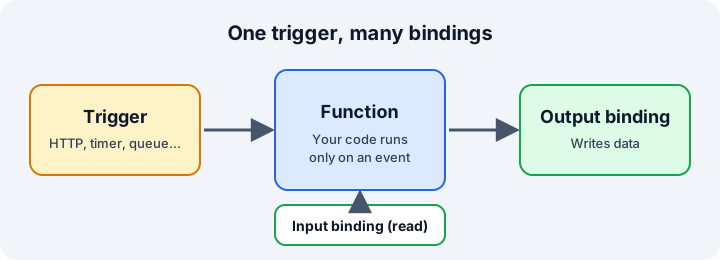
A trigger is what starts a function. A function has exactly one trigger.
Common triggers:
- HTTP.- A web request.
- Timer.- A schedule.
- Queue.- A new message in a storage queue.
- Blob (storage).- A new or changed file in storage.
- Cosmos DB, Event Hubs, Service Bus.- Changes and messages from these services.
HTTP trigger and authorization level
When you create a function you select the trigger and the authorization level (anonymous, function or admin).
[Function("Hello")]
public IActionResult Run(
    [HttpTrigger(AuthorizationLevel.Function, "get", "post")] HttpRequest req)
{
    return new OkObjectResult("Hello from Azure Functions");
}
Timer trigger
The schedule uses an NCRONTAB expression. It has six fields and starts with seconds:
{second} {minute} {hour} {day} {month} {day-of-week}
// Runs every 5 minutes
[Function("EveryFiveMinutes")]
public void Run([TimerTrigger("0 */5 * * * *")] TimerInfo timer)
{
    // code here
}
Queue trigger
The function runs when a new message arrives in a storage queue.
[Function("ProcessTodo")]
public void Run([QueueTrigger("todo-items")] string message)
{
    // message is the content of the queue item
}
Bindings
A binding is a connection to data. It saves you from writing the connection code.
- Input binding.- Gives read access to data.
- Output binding.- Lets you write to an external system.
A function can have many input and output bindings, but only one trigger.
Output binding example
An HTTP trigger that creates a message in a queue:
[Function("CreateTodo")]
[QueueOutput("todo-items")]
public string Run(
    [HttpTrigger(AuthorizationLevel.Function, "post")] HttpRequest req)
{
    // The returned string is written to the queue
    return "Buy milk";
}
Table storage
Every row in Table storage has a PartitionKey and a RowKey. Together they identify the row.
A common scenario is a Todo API:
- An HTTP function creates a todo and writes it to a table with an output binding.
- Another function reads the todos with an input binding.
Develop and Publish
Core Tools
# Create a new function app project
func init
# Create a new function
func new
# Run the function app locally
func start
You can also create and test functions from the Azure portal or from VS Code.
Publish to Azure
- Publish the project from VS Code or with Core Tools.
- Check in the portal that the function exists.
- Check the code and test it.
- Configure the scale out if you need it.
Hosting Plans
The hosting plan decides how the app scales, the resources of each instance, the network features and the cost.
| Plan | Notes |
|---|---|
| Flex Consumption | Serverless, scales to zero, pay per use, virtual network support. Recommended for new apps. |
| Premium | Prewarmed instances, no cold start, virtual network support. |
| Dedicated | Runs on an App Service plan. Always on, manual or rule-based scale. |
| Container Apps | Runs the functions as containers. |
| Consumption | Legacy plan. Use Flex Consumption instead. |
Networking
By default a function app is public. These features help to secure it:
- Inbound access restrictions.- Control who can call the app.
- Private endpoint.- Makes the app reachable only from a private network.
- Virtual network integration.- Lets the function reach resources inside a virtual network.
Support depends on the hosting plan. The Consumption plan does not support private endpoints or virtual network integration.
To test virtual network integration, use a VM in the network (connect with Azure Bastion) and call the function from there.
Durable Functions
Durable Functions is an extension of Azure Functions. It creates stateful serverless workflows, called orchestrations.
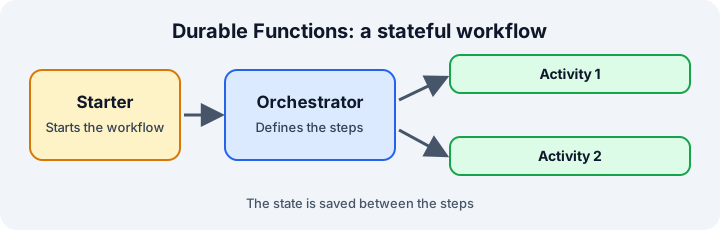
- Starter function.- Starts the orchestration, usually with an HTTP trigger.
- Orchestrator function.- Defines the steps of the workflow.
- Activity function.- Does the work of one step.
The state is saved between the steps. Because of that, the workflow can wait, and recover after a failure.
Common orchestration patterns:
- Function chaining
- Fan out / fan in
- Async HTTP APIs
- Human interaction
A sub-orchestration lets one orchestration start another.
Durable Functions Overview: Stateful Serverless WorkflowsLearn how Durable Functions extends Azure Functions to build reliable, stateful workflows in a serverless environment. Get started with supported languages, storage providers, and quickstarts.learn.microsoft.com
Custom Handlers
Use a custom handler to run a language or a runtime that Functions does not support natively, for example Go, Rust or Deno. It is not often necessary, but it is good to know it exists.
The function host receives the event, and sends it to your own web server.
- Create the function app with the custom handler option.
- In
host.json, indicate the path of the executable. - The web server must listen on
/api/FunctionName.
Example with Go: when the code is compiled, it generates a handler.exe file. This is the executable that host.json points to.
Run Anywhere
The Functions runtime is not only for Azure. You can run the functions in containers on Kubernetes.
- Scale with Kubernetes.
- To use a cluster, register it with Azure Arc first.
- After that, you can create and deploy a function app on the cluster like any other.
Key Takeaways
- A function runs only when a trigger starts it.
- A function has one trigger and any number of bindings.
- Use bindings instead of writing the connection code.
- Use Flex Consumption for new serverless apps.
- Use Durable Functions when the workflow needs state.
- Use custom handlers only for languages that Functions does not support.