




Develop Generative AI Apps
Table of Content
- Plan and Prepare
- Choose and Deploy Models
- Prompt Engineering
- Foundry SDK
- Prompt Flow
- RAG
- Fine-tuning
- Responsible AI
- Evaluate Performance
- Chat Apps and Tools
- Key Takeaways
Plan and Prepare
Before writing code, decide which AI capabilities the app needs. This decision guides the services you create.
- Generative AI and agents.- LLMs generate original answers. Agents add instructions and tools.
- NLP.- Analyzes the meaning of text (sentiment, classification).
- Speech.- Recognizes and synthesizes spoken language.
- Computer vision.- Interprets images, video and camera streams.
- Information extraction.- Gets structured data from unstructured content, like receipts and forms.
Microsoft Foundry
Microsoft Foundry is the recommended platform on Azure to build AI solutions. It has a portal and an SDK.
- Foundry resource.- The top-level Azure container. It gives compute, storage and tools.
- Foundry project.- The working environment. It has everything for one AI solution.
A project manages four types of assets:
- Models.- Deployments from the model catalog.
- Agents.- A named configuration of LLM + instructions + tools.
- Tools.- Built-in tools (web search, code interpreter) or custom tools using MCP (Model Context Protocol).
- Knowledge.- Connections to data stores. Foundry IQ joins them in one connection.

Foundry Tools
Prebuilt AI services inside Foundry. They are faster, cheaper and more predictable than an LLM for common tasks.
- Azure Language.- Entities, sentiment, summarization, Q&A.
- Azure Speech.- Speech-to-text and text-to-speech.
- Azure Translator.- Text translation.
- Azure Document Intelligence.- Fields from invoices, receipts and forms.
- Azure Content Understanding.- Documents, images, video and audio.
Languages, APIs and SDKs
You can use C#, Python, Node, TypeScript, Java and others. The common libraries are:
- Foundry SDK.- Connects to projects and their assets, like agents.
- OpenAI API.- Chat apps with the models that support the OpenAI syntax.
- Foundry Tools SDKs.- One library for each tool.
Choose and Deploy Models
Choose a model
Three questions guide the choice:
- Can AI solve my use case? Compare size, modality, specialization and openness.
- How do I select the best model? Filter by task type, precision, openness and deployment.
- Can I scale for real-world workloads? Think about deployment, monitoring and the GenAIOps lifecycle.
| Dimension | Options |
|---|---|
| Size | LLMs for deep reasoning. SLMs for speed and cost. |
| Modality | Text, multimodal, image generation, embeddings |
| Openness | Proprietary or open source |
Foundry shows benchmarks to compare models: accuracy, coherence, fluency, groundedness, quality index and cost.
Deploy to an endpoint
A model must be deployed to an endpoint before an app can use it. The endpoint is a unique URL.
- The app sends an API request to the endpoint.
- The endpoint routes it to the model.
- The model answers and the app gets the response.
| Standard | Serverless | Managed compute | |
|---|---|---|---|
| Models | Foundry models | Foundry models, pay-as-you-go | Open and custom models |
| Billing | Per token | Per token | Per VM |
| Best for | Most scenarios | Flexible usage | Dedicated infrastructure |
Prompt Engineering
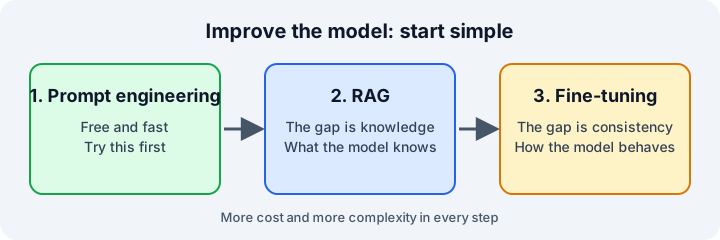
Prompt engineering is the first and cheapest way to improve the answers. Five patterns:
- Persona.- The model answers from a specific professional role.
- Better questions.- The model asks clarifying questions before it answers.
- Output template.- The model follows a format you provide.
- Reflection.- The model explains its reasoning step by step.
- Context injection.- The model focuses on specific topics or data.
Foundry SDK
The Foundry SDK gives access to a project from code. The main package is Azure AI Projects (azure-ai-projects in Python).
Each project has three endpoints:
- Project endpoint.- Connections, agents and models.
- Azure OpenAI endpoint.- APIs compatible with OpenAI.
- Foundry Tools endpoint.- The prebuilt tools.
from azure.identity import DefaultAzureCredential
from azure.ai.projects import AIProjectClient

# Connect to the project, no keys in the code
project_client = AIProjectClient(
    credential=DefaultAzureCredential(),
    endpoint="https://......")

# Get a chat client. It works with any model deployed in the project
openai_client = project_client.get_openai_client()
A chat message has one of three roles:
system.- Sets the behavior of the model. The user does not see it.user.- The question of the person.assistant.- A previous answer of the model. It keeps the history.
Prompt Flow
A flow is the full path from the user input to the final output. It is a pipeline, not a single call.
- Inputs.- The data that starts the flow.
- Nodes.- The processing steps. The output of a node can feed other nodes.
- Outputs.- The final data.
Built-in tools for the nodes:
- LLM tool.- Calls an LLM with a prompt.
- Python tool.- Runs a custom script.
- Prompt tool.- Builds the prompt as a string.
Types of flow:
- Standard flow.- General LLM apps.
- Chat flow.- Conversations, with history.
- Evaluation flow.- Scores the output of previous runs.
RAG
RAG (Retrieval Augmented Generation) grounds the model in your own data.
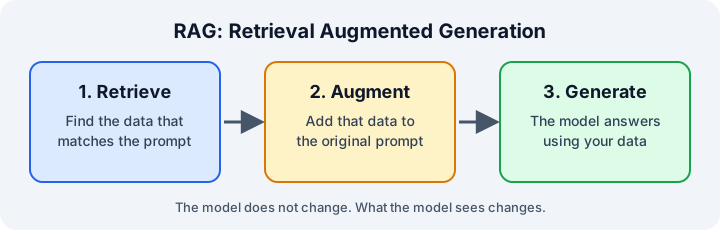
- RAG works without retraining the model.
- The quality of your data is critical.
- RAG and prompt engineering work together. RAG gives the facts, the prompt shapes how the model uses them.
Azure AI Search
Azure AI Search indexes your data so the app can find it. Three index types:
- Keyword.- Matches exact terms.
- Semantic.- Matches the meaning.
- Vector.- Matches embeddings. It needs an embedding model.
An embedding is a vector of numbers that represents the meaning of a text. Texts with a similar meaning are close to each other, even with different words.
Fine-tuning
Fine-tuning changes how the model behaves: style, format and tone.
| Strategy | Use it for |
|---|---|
| Prompt engineering | Quick changes |
| RAG | Facts from your data |
| Fine-tuning | Consistent style or format |
| RAG + fine-tuning | Facts and consistency together |
Techniques:
- Supervised fine-tuning.- Train with example conversations. Start here.
- Reinforcement fine-tuning.- Train with a reward. Good for complex reasoning.
- DPO.- Train with pairs of preferred and non-preferred answers.
- Function calling fine-tuning.- Train for correct calls to functions and APIs.
- Vision fine-tuning.- Train with images and text.
Use RAG when the problem is what the model knows. Use fine-tuning when the problem is how the model behaves.
Responsible AI
Four stages to follow:
- Map.- What could go wrong?
- Measure.- How often does it go wrong?
- Mitigate.- How do we reduce it?
- Manage.- How do we stay responsible over time?
Mitigation has four layers:
- Model.- Choose the right model. Fine-tune it with your data.
- Safety system.- Content filters and prompt shields.
- System message and grounding.- Instructions and RAG.
- User experience.- Constrain the inputs, validate the outputs and document the limits.
Evaluate Performance
Evaluate early and run the evaluation again after every important change.
- Manual.- Playground tests, structured reviews with scores from 1 to 5, and user studies.
- Automated.- Quality metrics (groundedness, relevance, coherence, fluency), safety metrics and NLP metrics (F1, BLEU, METEOR, ROUGE).
NLP metrics need a correct expected answer. They are not good for open-ended answers.
If the quality is low, try these steps in order:
- Improve the prompt.
- Try another model.
- Add RAG.
- Fine-tune.
Chat Apps and Tools
Four decisions before writing the app:
- Endpoint.- Project endpoint or Azure OpenAI endpoint.
- SDK.- Foundry SDK or OpenAI SDK. You can use both in the same app.
- Authentication.- Entra ID, API key or environment variables.
- Chat API.- Responses API or ChatCompletions API.
The Responses API is the recommended one for new projects. It keeps the state with previous_response_id, so you do not send all the messages again.
response = openai_client.responses.create(
    model="your-deployment-name",
    instructions="You are a helpful assistant.",
    input="What is prompt engineering?")

print(response.output_text)
Tools
Tools let the model go beyond its training data. You set them in the tools parameter. The model decides when to use them.
code_interpreter.- Runs Python code in a sandbox.web_search.- Searches the Internet for current information.file_search.- Searches your uploaded files.function.- Calls your own code, APIs or databases.
response = openai_client.responses.create(
    model="gpt-4.1",
    instructions="You are a helpful AI assistant.",
    input="Find me some information about vintage computers.",
    tools=[
        {"type": "web_search"},
        {"type": "code_interpreter"},
    ])
Key Takeaways
- Start with a Foundry project. It joins models, agents, tools and knowledge.
- Start simple: prompt engineering first, then RAG, then fine-tuning.
- Use Foundry Tools for specialized tasks. They are cheaper than an LLM.
- Use Entra ID in production.
- Use hybrid search for RAG.
- Use layers for responsible AI. No layer is enough alone.
- Evaluate from the beginning.