



Deploy Azure Functions with GitHub Actions
Table of Content
- Introduction
- The hosting plan
- Two workflows
- Azure setup
- The subject must match exactly
- Check the deployment
- Settings stay in Azure
- CORS
- Warnings that are not errors
- Resources
Introduction
A pipeline builds the code, runs the tests and deploys the function app on every push to main.
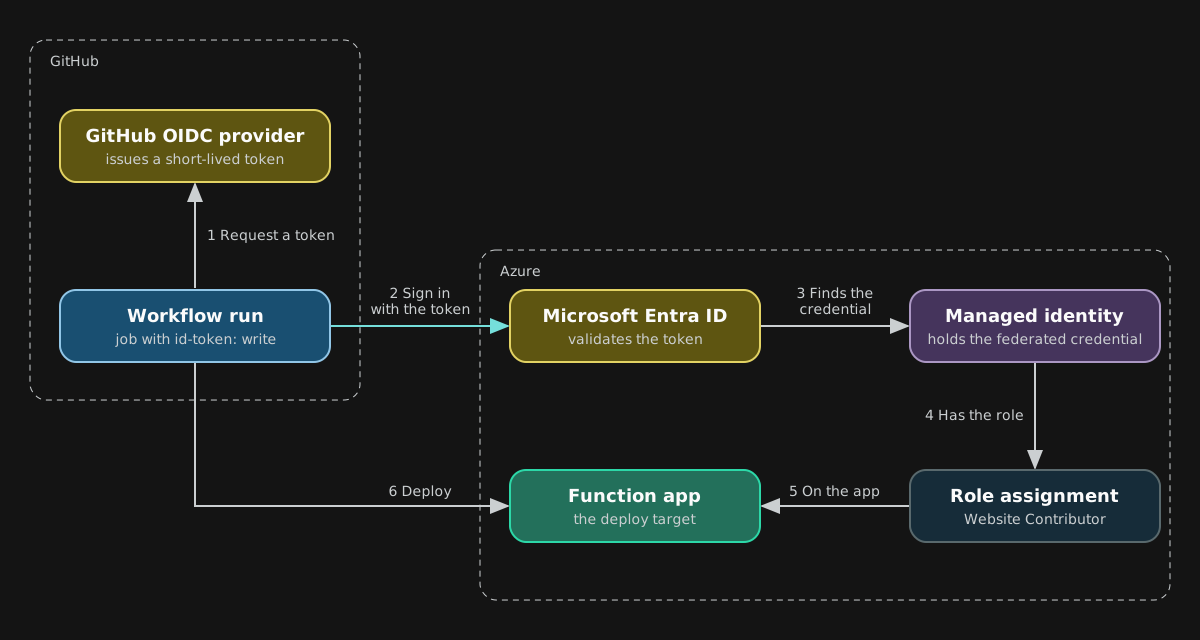
OIDC.- OpenID Connect. GitHub gives each workflow run a short-lived token. Azure trusts the token, so no password or publish profile is stored in GitHub.
Federated credential.- A trust record in Microsoft Entra ID. It says which GitHub repository and environment can sign in as an identity.
The hosting plan
.NET 10 on Linux is not supported in the plain Consumption plan. Use the Flex Consumption plan.
Guide for running C# Azure Functions in an isolated worker processLearn how to use the .NET isolated worker model to run your C# functions in Azure, which lets you run your functions on currently supported versions of .NET and .NET Framework.learn.microsoft.com
Two workflows
| File | Runs on | Does |
|---|---|---|
ci.yml | Pull requests, manual runs, and when called | Restore, strict build, tests with coverage. |
deploy.yml | Pushes to main, manual runs | Calls the CI, then publishes and deploys. |
ci.yml
name: CI

on:
  pull_request:
  workflow_dispatch:
  workflow_call:

permissions:
  contents: read

jobs:
  build-test:
    runs-on: ubuntu-latest
    steps:
      - uses: actions/checkout@v7
      - uses: actions/setup-dotnet@v6
        with:
          global-json-file: global.json
      - run: dotnet restore
      - run: dotnet build --no-restore --configuration Release
      - run: dotnet test --no-build --configuration Release --coverage --coverage-output-format cobertura --results-directory ./TestResults
      - uses: actions/upload-artifact@v7
        if: always()
        with:
          name: test-results
path: TestResultsworkflow_calllets another workflow reuse this file.global-json-fileinstalls the SDK thatglobal.jsonasks for. Use a full SDK version there, such as10.0.100. A wildcard version can fail in newer versions of the action.--coverageneeds the Microsoft.Testing.Platform mode. Set"test": { "runner": "Microsoft.Testing.Platform" }inglobal.jsonand add theMicrosoft.Testing.Extensions.CodeCoveragepackage to the test project.- GitHub sets
CI=true. A project can use it to fail the build on warnings. - A push to
mainis not in the triggers. The deploy workflow runs the CI, so the build does not run twice.
deploy.yml
name: Deploy

on:
  push:
    branches: [main]
  workflow_dispatch:

permissions:
  contents: read
  id-token: write # needed for OIDC

concurrency:
  group: deploy
  cancel-in-progress: false

jobs:
  ci:
    uses: ./.github/workflows/ci.yml

  deploy:
    needs: ci
    if: ${{ vars.AZURE_FUNCTIONAPP_NAME != '' }}
    runs-on: ubuntu-latest
    environment: production
    steps:
      - uses: actions/checkout@v7
      - uses: actions/setup-dotnet@v6
        with:
          global-json-file: global.json
      - run: dotnet publish src/MyFunctionApp/MyFunctionApp.csproj --configuration Release --output ./publish
      - uses: azure/login@v3
        with:
          client-id: ${{ vars.AZURE_CLIENT_ID }}
          tenant-id: ${{ vars.AZURE_TENANT_ID }}
          subscription-id: ${{ vars.AZURE_SUBSCRIPTION_ID }}
      - uses: Azure/functions-action@v1
        with:
          app-name: ${{ vars.AZURE_FUNCTIONAPP_NAME }}
          package: ./publish
id-token: writelets the job ask GitHub for the OIDC token.concurrencyruns one deployment at a time. A new push waits. If more pushes arrive while one is waiting, only the newest one stays in the queue.- The deploy job is skipped until the variable
AZURE_FUNCTIONAPP_NAMEexists. The CI still runs. environment: productionis part of the token subject. It can also require a reviewer.- Use
dotnet publishon the function project only.dotnet publishon the solution does not support--output, and it would put the test project in the same folder.
Azure setup
1. A user-assigned managed identity
The function app can already have one. It can hold the federated credential for GitHub.
2. The federated credential
az identity federated-credential create --name github-production `
  --identity-name <identity name> --resource-group <resource group> `
  --issuer https://token.actions.githubusercontent.com `
  --subject <subject> `
  --audiences api://AzureADTokenExchange
3. The role
The identity needs permission to deploy to the function app.
az role assignment create --assignee-object-id <identity principal id> `
  --assignee-principal-type ServicePrincipal `
  --role "Website Contributor" `
  --scope <function app resource id>
4. The variables
Add these in the repository (Settings, Secrets and variables, Actions, Variables).
| Variable | Value |
|---|---|
AZURE_FUNCTIONAPP_NAME | The name of the function app. |
AZURE_CLIENT_ID | The client id of the managed identity. |
AZURE_TENANT_ID | The Microsoft Entra tenant id. |
AZURE_SUBSCRIPTION_ID | The subscription id. |
They are identifiers, not secrets. Variables work in the job if, and secrets would not.
The subject must match exactly
The first deploy failed at the sign in step.
AADSTS700213: No matching federated identity record found for presented assertion subject
'repo:<owner>@<owner id>/<repo>@<repo id>:environment:production'.
The credential had the classic subject, repo:<owner>/<repo>:environment:production. GitHub sent a subject with the immutable ids of the owner and of the repository.
- Read the real subject in the error message.
- Update the credential to that exact value.
az identity federated-credential update --name github-production `
  --identity-name <identity name> --resource-group <resource group> `
--subject "repo:<owner>@<owner id>/<repo>@<repo id>:environment:production"After the update, run the failed workflow again. It can take a minute to work.
Check the deployment
- The portal lists the functions of the app.
- Call a read-only endpoint, for example
GET /api/status. - Right after the first deploy, a call can fail for two reasons. The app can still be starting, which can give a 503. Or a role can be missing or not active yet, which gives a 401 or 403. A role change can take up to 10 minutes. Wait and call again.
Settings stay in Azure
The workflow does not set app settings. Keep API keys and connection details in the Function App settings, for example as Key Vault references.
CORS
A browser page on another domain can call the API only if the function app allows its origin.
az functionapp cors add --resource-group <resource group> --name <function app> `
  --allowed-origins https://www.example.com
Warnings that are not errors
- GitHub warns that some actions run on Node 20. Runners use Node 24 by default since June 16, 2026, and Node 20 was scheduled for removal on September 23, 2026. A newer major version of the action fixes it. The workflows above use versions that run on Node 24. Dependabot proposes the update.
Resources
Deploy to Azure Functions by using GitHub ActionsSet up continuous deployment for your Azure Functions app by using GitHub Actions with OpenID Connect (OIDC) authentication.learn.microsoft.com