



Build a Local MCP Server in C#
Table of Content
- What is Bookshelf
- Why local and stdio
- Project layout
- SQLite with EF Core
- The tools
- Hide the private notes
- Check the tool contract
- Test with a real client
- CI and formatting
- Comments and clean code
- Tools that helped
- Resources
What is Bookshelf
Bookshelf is a local MCP server. It helps to keep a reading list: shelves, books and notes.
- The MCP client is the front end. For example Claude or GitHub Copilot in VS Code.
- There is no website and no REST API.
- The books stay on the machine, in a SQLite file.
- It uses .NET 10, the
ModelContextProtocolC# SDK and EF Core with SQLite.
The server is built in pieces. Each piece builds, runs and has tests before the next one starts:
- A project skeleton with the layers.
- SQLite persistence.
- The stdio host with the read tools.
- The write tools and the private notes.
Why local and stdio
A hosted service needs a database server, users and authentication. A local server needs none of them.
- The client starts the server as a child process.
- They talk through stdin and stdout. This is the stdio transport.
- There is no network endpoint, so there is nothing to protect with OAuth.
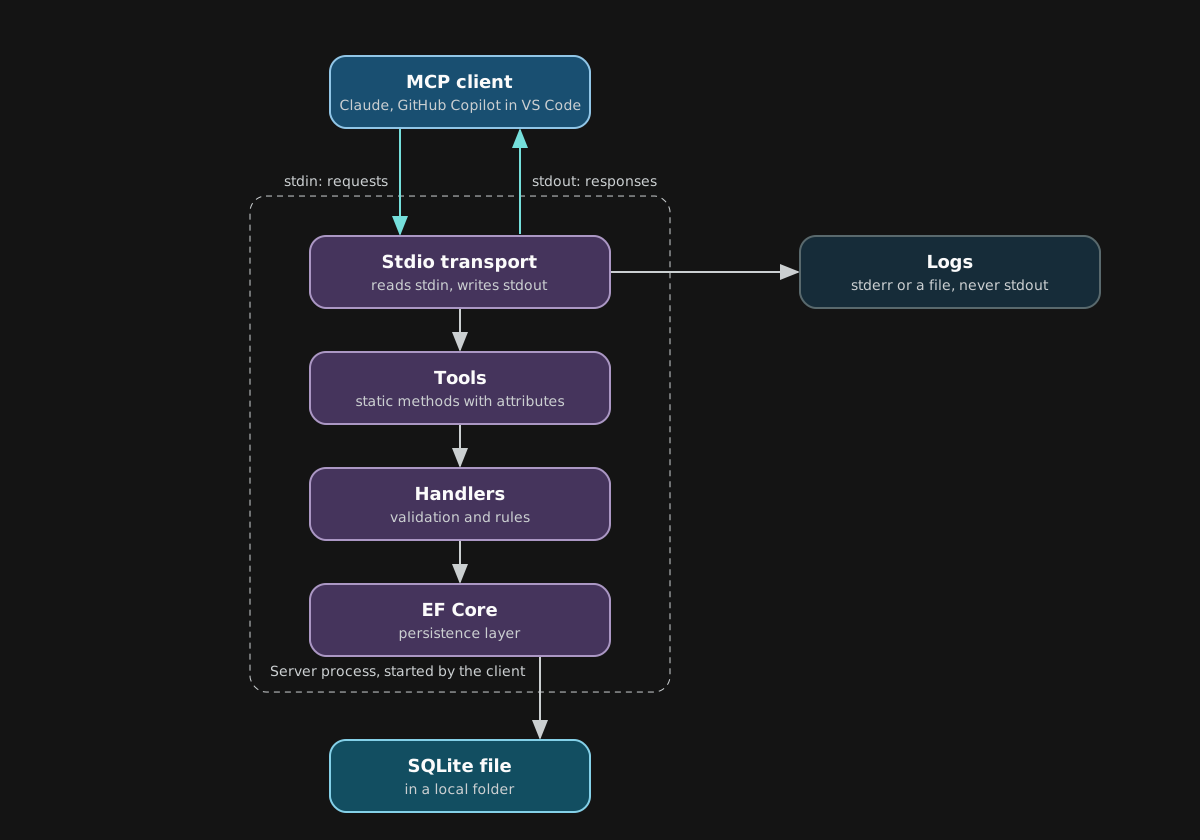
stdout belongs to the protocol. Any other text written there breaks the connection. Send the logs to stderr or to a file.
var builder = Host.CreateApplicationBuilder(args);

builder.Logging.ClearProviders();
builder.Logging.AddConsole(o => o.LogToStandardErrorThreshold = LogLevel.Trace);

builder.Services
    .AddMcpServer()
    .WithStdioServerTransport()
    .WithToolsFromAssembly();

await builder.Build().RunAsync();
The server also writes a daily log file next to the database. It does not log the text of the books and notes. It logs the tool name, the argument names, the numbers and the duration.
Project layout
Models: entities, DTOs and enums. It depends on nothing.Application: handlers, validators and the repository interfaces. It does not use EF Core.Persistence: the EF Core SQLite code.Mcp: the executable with the tools.
Architecture tests keep the layers apart. They use NetArchTest and fail if a lower layer references a higher one.
SQLite with EF Core
- The database file is in
LocalApplicationData/Bookshelf/bookshelf.db. - The environment variable
BOOKSHELF_DB_PATHchanges the location. - The server creates the folder and runs the migrations when it starts.
- EF Core takes a lock before it runs the migrations, so two server processes can start at the same time.
- On SQLite the lock is a row in the
__EFMigrationsLocktable. If the process is killed during a migration, the row can stay and the next start waits for it. Delete the row to fix it.
SQLite allows one writer at a time, even in WAL mode. Set WAL and a busy timeout on every connection. A short wait then retries instead of failing.
internal sealed class WalAndBusyTimeoutInterceptor : DbConnectionInterceptor
{
    private const string Pragmas =
        "PRAGMA journal_mode=WAL; PRAGMA busy_timeout=5000; PRAGMA synchronous=NORMAL;";

    public override void ConnectionOpened(DbConnection connection, ConnectionEndEventData eventData)
    {
        using var command = connection.CreateCommand();
        command.CommandText = Pragmas;
        command.ExecuteNonQuery();
    }
}
Add it to the context options:
options
    .UseSqlite($"Data Source={path}")
    .AddInterceptors(new WalAndBusyTimeoutInterceptor());
Other schema decisions:
- Enums are stored as strings.
- Shelf names use the
NOCASEcollation, soHistoryandhistoryare the same name. - Dates are UTC
DateTime, notDateTimeOffset. The SQLite provider does not translate comparison and ordering ofDateTimeOffsetto SQL, so they run on the client. The EF Core docs recommend UTCDateTime.
One test opened the raw database connection instead of the EF connection. The interceptor did not run, so the busy timeout was 0. The test passed on Windows only because of a pooled connection from the migration. It failed on Linux in CI. The fix is to open the connection through EF in the test.
The tools
- Read: list shelves, list books and get a book.
- Write: create, update and delete for shelves, books and notes.
- Private: get a private note.
A tool is a static method with attributes. The application handlers arrive as method parameters. The SDK creates a DI scope for each request, so scoped services work.
[McpServerToolType]
public static class BookTools
{
    [McpServerTool(Name = "bookshelf_get_book", Title = "Get a book", ReadOnly = true, OpenWorld = false)]
    [Description("Gets a book with its status and public notes, without private notes.")]
    public static async Task<CallToolResult> GetBook(
        IBookHandler bookHandler,
        [Description("The id of the book.")][Range(1, int.MaxValue)] int id,
        CancellationToken cancellationToken)
    {
        var book = ToolResults.Unwrap(
            await bookHandler.RetrieveBook(id, cancellationToken),
            ToolResults.BookNotFound(id));

        return ToolOutput.TextAndStructured(
            BookTextFormatter.Book(book), ResultMapper.BookToView(book));
    }
}
About the notes:
- A note is public or private. A private note is saved, but
get_booknever returns it. create_booktakes its notes inline. It validates all of them before it saves anything.
Errors
- Throw
McpExceptionfor an error the model should read. The SDK returns a result withisErrorset and shows the message. - Any other exception gives only a generic message.
- Say what to do next in the message. For example: “Book 999 was not found. Call
bookshelf_list_booksto see the valid book ids.”
Hide the private notes
The model must not see a private note unless the person asks for it.
get_bookreturnsBookView. It has no private note property, so it cannot leak.get_private_noteis a separate tool. The client can ask the person to approve it before it runs.- The model reads a private note only after that.
public record BookView(
    int Id,
    int ShelfId,
    string Title,
    string Author,
    ReadingStatus Status,
    IReadOnlyList<string> Notes);

public enum ReadingStatus
{
    NotStarted,
    Reading,
    Finished,
}
Avoid a nullable flag such as bool? IsFinished, where null means “not started”. An enum says the same in its name, so no comment is needed.
Check the tool contract
A review with the mcp-builder skill found problems. A real tools/list call over stdio confirmed them.
Annotations
- Unset hints are not sent. Clients then assume the spec defaults: destructive and open world.
- So the create tools looked destructive, and every tool looked like it talks to an external service.
- Set every hint and a
Titleon every tool.
The policy:
- Read tools:
ReadOnly. - Create and add:
Destructive = false,Idempotent = false. - Update:
Destructive = true,Idempotent = true, because it overwrites existing values. - Delete:
Destructive = true,Idempotent = true. - All tools:
OpenWorld = false, because they only use the local database.
[McpServerTool(
    Name = "bookshelf_delete_book",
    Title = "Delete a book",
    Destructive = true,
    Idempotent = true,
    OpenWorld = false)]
Names
Use a service prefix. The server runs next to other servers, and names like get_book can clash. All the tools start with bookshelf_. Keep the names in one class of constants.
Structured output
A tool can return text and typed structured content together. The text is for people and models. The structured content is for programs, for example a UI.
- Return a
CallToolResultwith both. - The SDK cannot infer an output schema from a
CallToolResult. Declare the result type with an attribute and add the schema in the list tools filter. - Newer versions of the SDK can do this without the filter, with
UseStructuredContentandOutputSchemaTypeonMcpServerTool. Check the version in use. An old version ignores them, and the tool then has no output schema.
foreach (var tool in result.Tools)
{
    if (OutputSchemas.TryGet(tool.Name, out var outputSchema))
    {
        tool.OutputSchema = outputSchema;
    }
}
Input schema
DataAnnotationson the parameters become limits in the schema:StringLength,MinLength,MaxLengthandRange. The validators on the server stay the authority.- Depending on the SDK version, nested required fields and array items can be advertised as nullable. A client then accepts a missing value, and the server returns an error after the call. Check the schema from
tools/list. Remove thenullfrom the required ones, so clients can validate before they call. - An optional parameter needs a default. Without
= null, the SDK treats it as required, and a call that leaves it out fails with a generic error.
[Description("Optional note about the book.")]
[MaxLength(2000)] string? note = null,
Pin it with a test
One test class pins the whole contract: names, annotations, required inputs, limits and schemas. It was checked by removing one annotation on purpose. The test failed and named the tool.
Test with a real client
The integration tests start the real server as a child process over stdio. They use a seeded temp database and the SDK client.
var transport = new StdioClientTransport(new StdioClientTransportOptions
{
    Command = "dotnet",
    Arguments = [Path.Combine(AppContext.BaseDirectory, "Bookshelf.Mcp.dll")],
    EnvironmentVariables = new Dictionary<string, string?>
    {
        ["BOOKSHELF_DB_PATH"] = databaseFile,
    },
});

await using var client = await McpClient.CreateAsync(transport);
var result = await client.CallToolAsync(
    "bookshelf_get_book", new Dictionary<string, object?> { ["id"] = 1 });
A flaky handshake
- By default, the SDK client first sends a
server/discoverprobe and waits 5 seconds. Then it falls back toinitialize. - On a slow Windows CI runner, one test failed in two different runs with:
Method 'initialize' is not available on protocol version '2026-07-28'. - It did not happen on a local machine.
- The fix in the tests is to ask for the
initializehandshake directly. Three CI runs in a row were green after that.
var client = await McpClient.CreateAsync(
    transport,
new McpClientOptions { ProtocolVersion = "2025-11-25" });The server also migrates the database in the background. It starts to answer the handshake at once, and the tool calls wait until the database is ready.
CI and formatting
The pipeline runs the build and the tests on Ubuntu and Windows. It also runs dotnet format --verify-no-changes.
.editorconfigasks for CRLF line endings. Without a.gitattributesfile, a Linux checkout has LF, and the format check fails on every file.- The formatter and StyleCop disagree on a few constructs, and the check then never settles. Avoid
new (),string[]?,x[0]!and collection expressions with brackets. - StyleCop rule SA1313 asks for parameter names that start with a lower-case letter. The docs say positional records are exempt, but some versions of the analyzer still report them. The warning then fails the build when warnings are errors. If it happens, turn the rule off for the folder with the result records.
Comments and clean code
Comment only when it is absolutely necessary. Names do the work.
- Rename the variable, the method or the class first.
- Extract a method with a clear name.
- Use an enum, or a type, instead of a nullable flag that needs an explanation.
- Keep a comment for a reason the code cannot say, such as a quirk in an SDK.
For example, a comment said “register this service before the MCP server”. The migration now starts lazily, so the order does not matter and the comment is gone.
Tools that helped
- The
dotnet new mcpservertemplate. It addsPackAsTool,PackageType=McpServerand a.mcp/server.jsonfile. A user runs the package withdnx. - The template has options for transport, native AOT, self-contained publish and framework.
- Native AOT does not fit this server. EF Core, Mapster, FluentValidation and
WithToolsFromAssemblyuse reflection. - Microsoft Learn and Context7, to check the SDK docs instead of the memory of the model.
- The
mcp-builderskill, to review the tools. Its guides cover Python and TypeScript, so the C# details came from the Microsoft docs.
Resources
GitHub - modelcontextprotocol/csharp-sdk: The official C# SDK for Model Context Protocol servers and clients. Maintained in collaboration with Microsoft.The official C# SDK for Model Context Protocol servers and clients. Maintained in collaboration with Microsoft. - modelcontextprotocol/csharp-sdkgithub.com MCP servers in NuGet packagesHow can MCP servers be distributed using NuGet?learn.microsoft.com
 SQLite Database Provider - Limitations - EF CoreLimitations of the Entity Framework Core SQLite database provider as compared to other providerslearn.microsoft.com
What is the Model Context Protocol (MCP)? - Model Context Protocolmodelcontextprotocol.io
 GitHub - anthropics/skills: Public repository for Agent SkillsPublic repository for Agent Skills. Contribute to anthropics/skills development by creating an account on GitHub.github.com