



SEO for an Astro Blog
Table of Content
- Introduction
- The search card
- The favicon
- Other tags in the head
- Structured data
- Sitemap and robots.txt
- Images
- Checklist
- Resources
Introduction
Search engines show a card for each page they list. The card needs a title, a description and an icon.
If one of them is missing, the search engine picks something else. The result can be random text from the page and a grey globe as the icon.
This post explains why each tag is needed and how to add it to an Astro site.
SEO.- Search Engine Optimization. Actions that help search engines find, understand and show your pages.
The search card
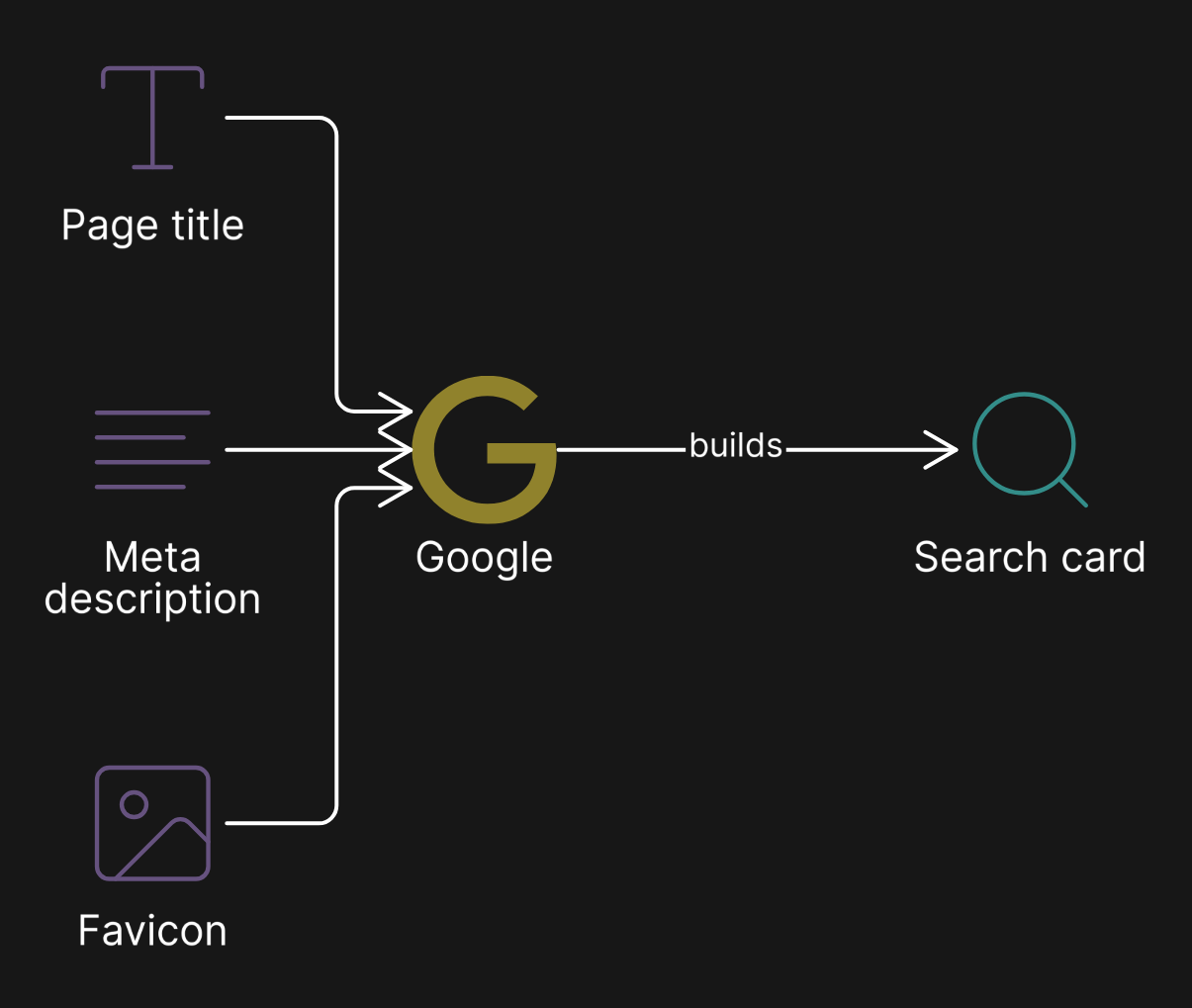
Google builds the card from three things.
- Title.- The
<title>of the page. - Snippet.- The
<meta name="description">. If it is missing, Google picks text from the page. - Icon.- The favicon.
Meta description
Why.- A page without a meta description gets a snippet from its own text. For a home page, that is often the first lines of an About section, not what the site is about.
How.- Set one default description for the whole site. A page can give its own description when it needs one.
// src/scripts/constants.ts
static readonly DESCRIPTION =
    "A short sentence that says what the site is about.";
The head component uses the default when a page does not give its own description.
---
const { description = General.DESCRIPTION } = Astro.props;
---
<meta name="description" content={description} />Page title
Why.- The title is the headline of the card. A title like Posts alone says nothing in a search result.
How.-
- Home page: the site name and what the site is about, for example
Site name | Blog on .NET, Azure and web development. - Other pages: the page name and the site name, for example
Azure Functions | Site name.
The favicon
Why.- Google shows the favicon next to the result. If the icon is missing or has the wrong shape, Google shows a grey globe.
Google wants an icon that is:
- Square.
- A multiple of 48px.
- At a URL that crawlers can open.
An SVG that is not square, and no /favicon.ico, is a common cause of the grey globe.
How.- Create these files from the logo, for example with sharp.
favicon.ico(32px and 48px)favicon-48.png,favicon-192.png,favicon-512.pngapple-touch-icon.png(180px)
Then link them in the head.
<link rel="icon" href="/favicon.ico" sizes="32x32" />
<link rel="icon" type="image/svg+xml" href="/favicon.svg" />
<link rel="icon" type="image/png" href="/favicon-48.png" sizes="48x48" />
<link rel="icon" type="image/png" href="/favicon-192.png" sizes="192x192" />
<link rel="apple-touch-icon" href="/apple-touch-icon.png" />Other tags in the head
Canonical URL
Why.- Tells search engines which URL is the main one, when the same page opens from more than one URL.
<link rel="canonical" href={new URL(Astro.url.pathname, Astro.site)} />Open Graph and Twitter
Why.- Control the card when someone shares a link.
How.- Add og:title, og:description, og:image, og:site_name and the same for twitter:*. Use a default 1200×630 image for the pages that do not have their own.
noindex
Why.- Some pages should not be in search results, like the 404 page.
<meta name="robots" content="noindex, nofollow" />RSS link
Why.- Lets readers and tools find the feed.
<link rel="alternate" type="application/rss+xml" title="Site name" href="/rss.xml" />Structured data
JSON-LD.- A small block of JSON in the page. It tells search engines what the page is, using the schema.org vocabulary.
Why.- Search engines understand the page better and can show richer results.
How.- Use these types.
- Home page:
WebSiteandPerson. - Each post:
BlogPostingandBreadcrumbList.
<script type="application/ld+json" set:html={JSON.stringify({
    "@context": "https://schema.org",
    "@type": "BlogPosting",
    headline: title,
    description,
    datePublished: publishDate.toISOString(),
    author: { "@type": "Person", name: "Author name" },
})} />
Sitemap and robots.txt
Sitemap.- A file that lists the pages you want search engines to find.
Why.- It helps search engines find every page, also the new ones.
How.- Astro has an integration for this. A small endpoint is an option when full control is needed, for example to skip the drafts.
// src/pages/sitemap.xml.ts
import { getPublishedPosts, postHref } from "src/scripts/posts";

export const GET: APIRoute = async ({ site }) => {
    const posts = await getPublishedPosts(); // no drafts
    // ...one <url> per page, with <lastmod>
};- It is built from the posts on every build. Nobody edits it by hand.
- Drafts are not listed.
- A new top-level page must be added to the list of static paths.
Then add the sitemap to robots.txt.
User-agent: *
Disallow:

Sitemap: https://www.example.com/sitemap.xml
Images
Alt text
Why.- Screen readers and search engines use it to know what the image shows.
How.-
- Images that carry information need a real
alt, like a diagram or a portrait. - Decorative images use
alt="", so screen readers skip them. Technology logos next to their name are an example. - Keep it short and clear, for example
Portrait of the author.
Width and height
Why.- An image without width and height has no reserved space. The page moves when the image loads. This is the Cumulative Layout Shift (CLS) metric.
How.- Images in markdown cannot have these attributes. A small rehype plugin can read the viewBox of each SVG diagram and add the size.
// src/scripts/rehype-image-size.mjs
node.properties.width = size.width;
node.properties.height = size.height;
node.properties.loading = "lazy";
// astro.config.mjs
markdown: {
rehypePlugins: [rehypeImageSize],
}Checklist
- A meta description on every page.
- A square favicon, with
/favicon.ico. - A canonical URL.
- Open Graph and Twitter tags with an image.
noindexfor pages that must not be in the results.- JSON-LD for the site and the posts.
- A sitemap that skips drafts, listed in
robots.txt. - Alt text,
widthandheighton images.
Resources
Define Website Favicon for Search Results | Google Search Central | Documentation | Google for DevelopersIf your website has a favicon, it can be included in your Google Search results. Follow these favicon SEO instructions to make your site eligible.developers.google.com BlogPosting - Schema.org TypeSchema.org Type: BlogPosting - A blog post.schema.org